Set up the 2:1 workspace
Choose a tile width
Open the current editor and set Iso tile width to an even value such as 16 or 32. The width controls the horizontal span of the 2:1 diamond guide.
Turn on alignment
Enable Isometric guide to show the diamond grid, then enable Iso snap so drawing points land on the guide. Grid and snapping are editor aids; they do not alter the document's pixel dimensions.
Stamp a starter tile
Open Isometric shapes, choose Tile, Block, or Ramp, and use Stamp shape to place editable pixels on the current layer and frame. Move and refine them like any other PixelWall artwork.
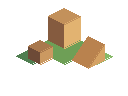
Compose terrain and structures
The draw.isometric command creates one reusable 2D shape at a ground vertex. Choose shape tile, block, or ramp; set x and y, a width in multiples of four, elevation, and filled or outline treatment. Use leftColor and rightColor when you want a simple shaded face pair. The command is deterministic and remains ordinary editable pixels.
Use a small number of shared widths and elevations to keep an isometric scene readable. Place water, banks, paths, buildings, and props on layers that can be edited independently. A shape command does not infer neighboring terrain or collision.
const before = window.pixelwall.inspect();
await window.pixelwall.apply({
  expectedRevision: before.revision,
  label: "Block out an isometric dock",
  commands: [
    { type: "draw.isometric", shape: "tile", x: 32, y: 18, width: 32, elevation: 0, color: "#9b7046ff", filled: true },
    { type: "draw.isometric", shape: "block", x: 32, y: 18, width: 32, elevation: 12, color: "#c2915bff", leftColor: "#8d623dff", rightColor: "#e0ae70ff", filled: true },
    { type: "draw.isometric", shape: "ramp", x: 64, y: 34, width: 24, elevation: 8, color: "#b27e4dff", filled: true }
  ]
});
await window.pixelwall.save();
Add water and export the foundation
Run scene.water on a blank document or with replace:true when you intentionally replace existing artwork. Use waterSeed to vary the animation independently from the shoreline geometry, rippleDensity for quieter or busier highlights, and phaseOffset when matching a water piece to a neighboring loop. The generator does not guarantee spatial tiling between separate documents or pieces.
PixelWall exports ordinary pixel frames and editable projects. It does not currently export a 3D scene, height-aware terrain, depth sorting, collision map, connected autotiles, or a universal isometric tilemap. Bring the rendered frames and your shape metadata into the game or map tool that owns those systems; those are the natural next pieces for a fuller isometric workflow.
node pixelwall.mjs new --width 96 --height 64 --name "Isometric Dock" --out dock.pixelwall
node pixelwall.mjs apply dock.pixelwall --commands isometric-dock.json --out dock-generated.pixelwall
node pixelwall.mjs render dock-generated.pixelwall --frame 0 --scale 4 --out dock-preview.pngCommon questions
Does isometric mode make a 3D model?
No. It provides a 2:1 pixel grid, snapping, editable shape stamps, and 2D water treatments. Camera, height, lighting, collision, and depth systems remain outside PixelWall.
Can an agent reproduce the same scene?
Yes. Keep the JSON command batch, document dimensions, shape parameters, and water seeds together. Repeating the same inputs produces the same generated pixels.
Can separate water pieces tile perfectly?
No guarantee is provided for spatial tiling between separate generated pieces. Use one larger water document or hand-edit seams after rendering.