Start with shapes for broad areas
A 600 × 350 canvas contains 210,000 pixels per full-size layer. Filling it one pixel at a time through a scripting API adds unnecessary calls. Use draw.rect, draw.polygon, draw.ellipse, and draw.line for large areas and repeated marks. For a procedural raster, consider one cel.set pixel buffer within the command size limit.
This tutorial creates 576 commands across four full-size raster layers: Meadow and riverbed; River and bank details; Woodland footbridge; and Woodland and flowers. Broad shapes establish the meadow and irregular banks, shaded water carries the river, framed trees leave quiet areas around a simple wooden bridge, and small accents finish the crossing. The provided project and PNG let you inspect the result before running anything.
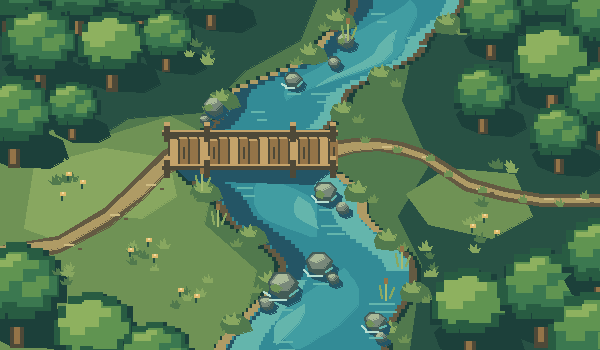
Run the scene in the editor
Create a new 600 × 350 document first. The example uses the default layer-1 and frame-1 IDs and adds its own named layers, so apply it once to that new document. In Scripts → Commands, paste the downloaded JSON. A browser agent with page execution can use the following equivalent calls.
For a long operation, retain its operationId and poll in separate short calls. commandsProcessed counts staged commands; it does not mean they have committed. Only status completed confirms that the entire batch committed as one undoable edit.
const api = window.pixelwall;
await api.newDocument({width:600, height:350, name:"Woodland crossing"});
// Load the downloaded JSON array into commands.
const before = api.inspect();
const job = await api.apply({
  commands, expectedRevision:before.revision,
  label:"River base shapes", wait:false
});
// Make this call again later; avoid one long browser-tool wait.
const progress = api.operation(job.operationId);
// {status, commandsProcessed, commandsTotal, revision, ...}
// Save once the full batch has committed:
if (progress.status === "completed") await api.save();
Use Lua for a small, bounded detail
The companion script creates a detached 16 × 16 image, draws a few reed stems, and attaches it as a new cel on a named layer. The four 600 × 350 raster layers total 840,000 pixels, which stays within the Lua input budget while leaving room for this bounded 16 × 16 detail. Use small per-pixel loops for custom details; use shapes or bulk image data for large uniform areas. Detached images also let you assemble a detail before attaching it.
The Lua timeout can be raised to 10,000 ms, but larger limits do not turn an inefficient full-canvas loop into a good workflow. A timed-out or failed script discards its staged result. Inspect the revision after a failure and change the approach before retrying. Successful separate batches remain committed; rollback applies to the failed transaction.
-- Run after agent-river-commands.json on the 600 x 350 tutorial project.
-- Keep per-pixel work small: this detached 16 x 16 image has only 256 cells.
app.transaction("Add a small reed sprite", function()
  local image = Image(16, 16)
  local green = Color{r=137, g=181, b=89, a=255}
  for y = 2, 14 do
    image:drawPixel(7, y, green)
    if y > 6 then image:drawPixel(11, y, green) end
    if y > 9 then image:drawPixel(3, y, green) end
  end
  local layer = app.sprite:newLayer()
  layer.name = "Lua reed detail"
  app.sprite:newCel(layer, app.sprite.frames[1], image, Point(180, 180))
end)
print("Reed detail added as one undoable edit")Recover when a caller stops waiting
A browser automation timeout may only mean the caller stopped waiting while the editor continued. Reconnect to the same open editor and inspect latestOperation, or look up the saved operationId with operation(id). Do not resend an edit solely because a client timed out.
If status is running, keep polling. If completed, inspect the new revision and save. If failed, read error and inspect the unchanged live document before correcting the batch. The operation log is in memory and retains the latest 64 operations; closing or reloading the editor removes it. After a reload, inspect artwork and saved recovery revisions before deciding whether to rerun anything.
Split very large jobs into at most 2,000 commands and 16 MiB of JSON per batch; use smaller batches when individual commands are expensive. Wait for completion, inspect the new revision, and save between batches. Each batch is one Undo step.
const state = window.pixelwall.inspect();
const job = state.latestOperation;
if (job) {
  const progress = window.pixelwall.operation(job.id);
  console.log(progress.status, progress.commandsProcessed,
    progress.commandsTotal, progress.revision, progress.error);
}
Separate file generation from download completion
Generate an export without clicking a download by passing download:false. The result separates generated files from download requests. Each file supplies its filename, MIME type, byte length, and a page-local object URL. A sheet export includes both PNG and JSON.
Read or copy the bytes in the same editor page before another export, dismissal, or editor close revokes those URLs. The URLs are not public network links and cannot be fetched from another process. For local automation without page execution, use the CLI to write to an explicit path.
download.status = requested means an anchor click was requested; browser download completion remains unobservable. Confirm the file in your own download manager or filesystem. exportResult() retrieves the latest handoff after a caller timeout.
const result = await window.pixelwall.export({format:"png", download:false});
const handoff = result.exportResult;
const file = handoff.generated.files[0];
const bytes = new Uint8Array(await (await fetch(file.url)).arrayBuffer());
console.log(file.filename, bytes.length, handoff.download.status);
// Persist bytes with your host's approved file-transfer mechanism.
// Or request a regular browser download by omitting download:false.
Keep an editable backup and run the same workflow locally
PixelWall 0.4.1 saves losslessly compressed PWPZ .pixelwall files and still opens legacy JSON project files. Layers, frames, image links, palettes, and project metadata stay editable. File size depends on the artwork; flat pixel scenes can compress especially well. Older PixelWall versions cannot read the new container, so update before opening it.
Use CLI --format json when you need a readable project payload for an older tool. Keep the compact project as your editable backup and use PNGs for finished transparent sprites. A local save and a downloaded backup are separate checkpoints.
node pixelwall.mjs new --width 600 --height 350 --name "Woodland crossing" --out river.pixelwall
node pixelwall.mjs apply river.pixelwall --commands agent-river-commands.json --out river.pixelwall
node pixelwall.mjs script river.pixelwall --script agent-river-detail.lua --timeout 10000 --out river-detailed.pixelwall
node pixelwall.mjs render river-detailed.pixelwall --frame 0 --out river.png
node pixelwall.mjs export river-detailed.pixelwall --format json --out river.json