
Compose a woodland crossing
Choose a kind such as tree, rock, bank, bridge, or terrain, then provide a seed, style, palette, position, and size. Repeat the same inputs for the same component. Keep a shared palette and place components on separate named layers so later edits remain local.
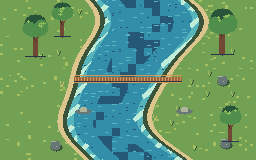
The polished 256 × 160 example combines a river base with clustered trees, faceted rocks, grassy banks, and a bridge that reaches both banks. It is a compact editable project rather than a flattened reference image.
Keep the workflow agent-friendly
Use broad component shapes for large areas and small detail commands for accents. Validate a batch before applying it, split long work into observable operations, and save after each completed stage. Scene components do not infer collision, height, depth sorting, autotiles, or a game map schema.