
The finished world
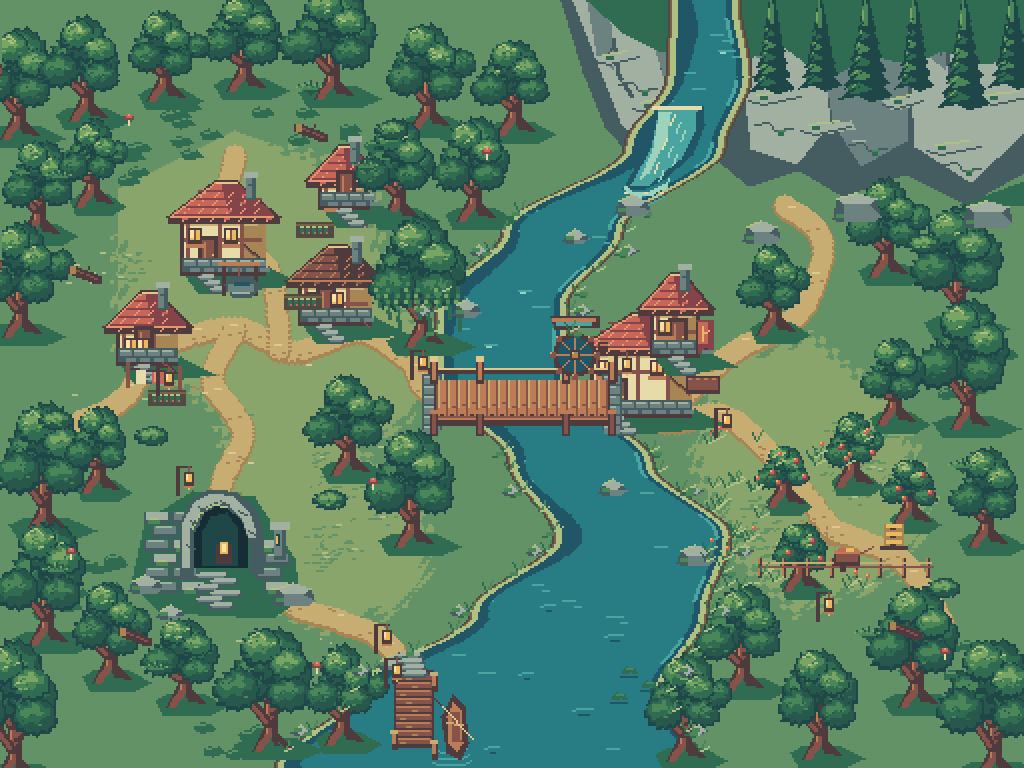
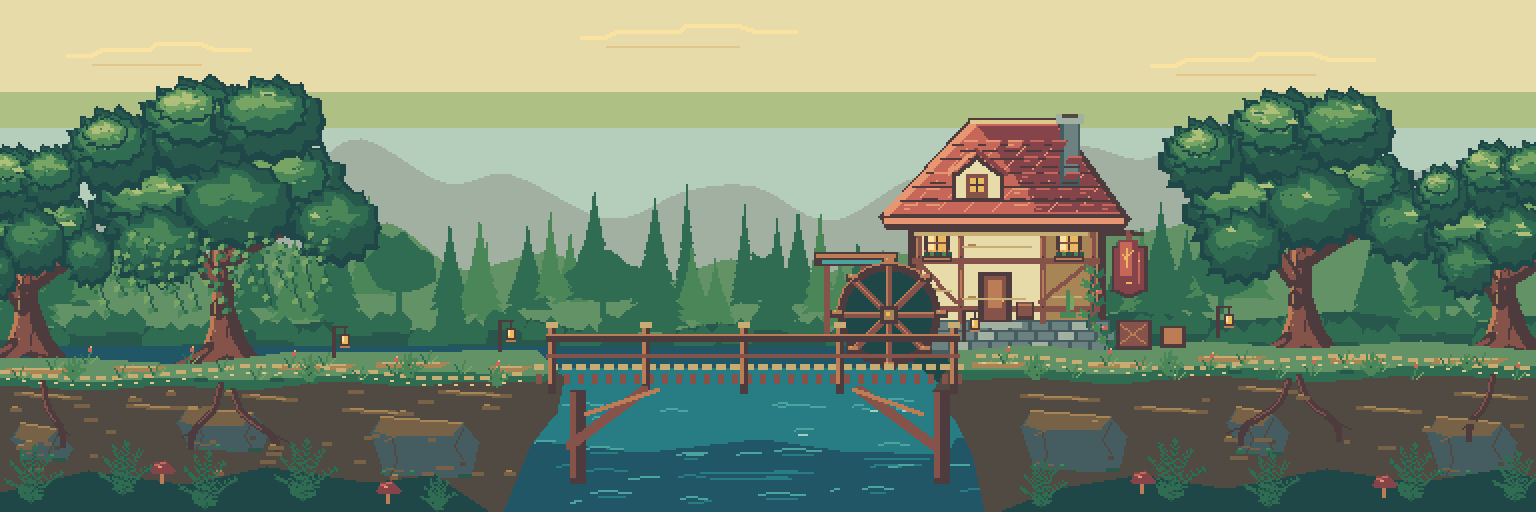
Willowmere is a woodland route held together by a winding river, warm lanterns, and a shared 32-color palette. The top-down valley and side-view Lantern Ford use the same visual language. Mira, the river courier, and the mosslight reedling bring that setting down to character scale.
This project used an external AI coding agent to author supported PixelWall commands and pixel buffers, followed by visual review and revisions. PixelWall supplied the editable layers, cels, palettes, timeline, and rendered exports. PixelWall contains no AI model, and no externally generated image was imported as artwork.
Updated art direction edition: the environments now have fuller tree crowns, richer paths and masonry, revised water accents, and twelve-phase turning waterwheels. A separate Lantern Ford composition puts both characters on editable PixelWall paint layers. The viewer loads one complete asset release before showing the artwork or starting playback.
- Overworld: 512 × 384 pixels, 15 layers, 12 frames at 100 ms per frame.
- Lantern Ford: 768 × 256 pixels, 13 layers, 12 frames at 100 ms per frame.
- Lantern Ford showcase: 768 × 256 pixels, 20 layers, 12 frames, with the characters retained on independently editable layers.
- Mira: 32 × 48 pixels, three painted layers, 20 poses across Idle, Walk, and Jump.
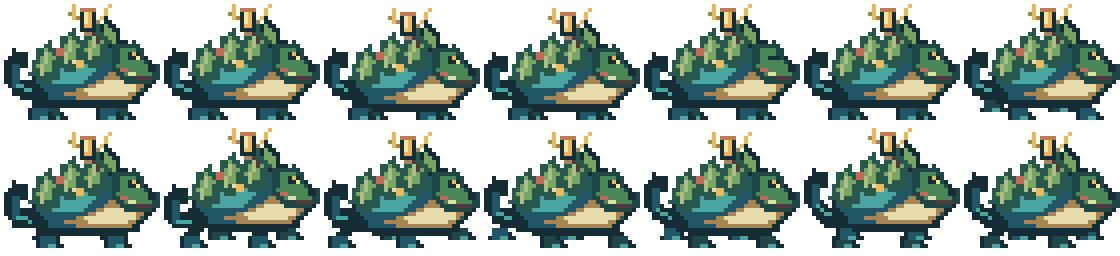
- Mosslight reedling: 40 × 32 pixels, three painted layers, 14 poses across Idle and Walk.
1. Open the files and set up the CLI
For an immediate look, download the native projects below and choose Open project or image in PixelWall. Inspect the layers and named animation clips, then save an independent copy before experimenting. The original workflow was tested with desktop 0.5.0; the downloads page supplies the current release.
To reproduce the artwork, extract the public package into a new working folder. Install Node.js 22.13 or newer, download the official CLI ZIP, and extract its contents into tools/cli inside that folder. The CLI bundle includes its dependencies; no npm install is needed. Run every command below from the extracted package root. Use a folder with enough free disk space for the generated projects and PNGs.
node --version
node tools/cli/pixelwall.mjs help
node tools/cli/pixelwall.mjs inspect projects/overworld.pixelwall
mkdir -p reproduced
node tools/cli/pixelwall.mjs render projects/sideview.pixelwall --frame 11 --scale 2 --out reproduced/ford-preview.png2. Start with a tiny animated riverbank
The starter exercise is a 128 × 96 RGBA scene. It teaches the same construction method as the larger world: broad shapes for the ground and river, named layers for separate visual roles, linked cels for static artwork, and a few deliberately animated details.
Create a blank project, apply the saved command batch once, then run the small Lua detail. The finished document should contain nine named layers and twelve 100 ms frames. Open it and play the Riverbank • 1.2s clip. The banks and roots stay fixed, the crown moves gently, and pale streaks travel across the teal water.
mkdir -p reproduced/tutorial
node tools/cli/pixelwall.mjs new --width 128 --height 96 --name Riverbank --out reproduced/tutorial/empty.pixelwall
node tools/cli/pixelwall.mjs apply reproduced/tutorial/empty.pixelwall --commands tutorial/riverbank-commands.json --out reproduced/tutorial/riverbank.pixelwall
node tools/cli/pixelwall.mjs script reproduced/tutorial/riverbank.pixelwall --script tutorial/reeds.lua --timeout 10000 --out reproduced/tutorial/finished.pixelwall
node tools/cli/pixelwall.mjs render reproduced/tutorial/finished.pixelwall --frame 11 --scale 4 --out reproduced/tutorial/frame11.png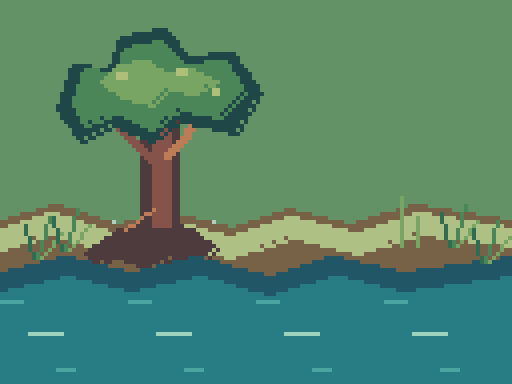
3. Use Lua for a small detail
The reeds.lua script draws a detached 16 × 16 reed clump and attaches it to all twelve frames. It does not loop over the whole canvas or use file or network access. Broad rectangles, polygons, ellipses, and lines are a better fit for large areas; small pixel loops are useful for a tightly bounded detail.
A cel holds a layer’s image at a particular frame. Adding a detail only to frame zero will make it disappear later unless you deliberately expose or link it across the timeline. An early version of this exercise missed an exposure; the final supplied exercise corrects it and was rebuilt independently.
Try a small revision: in tutorial/riverbank-build.mjs, change Math.round(Math.sin(f*Math.PI/6)) to Math.round(2*Math.sin(f*Math.PI/6)). Run node tutorial/riverbank-build.mjs to regenerate the commands, then repeat the lesson into a new output folder. Compare the original one-pixel sway with the windier two-pixel version.
4. Compose the world before adding detail
Give the scene a readable route
Use the river and paths to guide the eye between the mill, bridge, waterfall, ruin, orchard, village, and landing. Establish those large shapes before decorating the banks.
Assign colors a job
Deep blue-green defines outlines and shadow, teal separates water from land, cream and pale green pick out foam and light, and coral and brass give the characters and lanterns warm accents. The saved 32-color palette travels with the projects.
Separate structure from motion
Keep buildings, banks, trunks, and the bridge anchored. Put ripples and tree crowns on layers that can change without moving their surroundings. Link unchanged cels instead of repainting every frame.
Review at native size
Check the route, focal points, and silhouettes at 1×, then enlarge with nearest-neighbor scaling to inspect pixel edges. Add texture only where it improves readability.
5. Rebuild the two environments
This edition starts from the earlier environment projects included in base/. The exact final edit manifests rebuild the revised scenery and animation on those projects. Use the earlier public package, linked below, to study the initial blockout, completion, detail, and polish stages from a blank canvas.
The helper applies at most 100 commands and approximately 8 MB per batch. Run the sequence into fresh output files so the supplied originals remain intact. Each successful batch commits independently; a failed batch does not roll back earlier completed batches.
The final command composes the unchanged courier and reedling pixels onto the revised side view with supported PixelWall cel commands. It adds contact shadows and separate painted character layers. The resulting marketing composition is a native editable project.
mkdir -p reproduced
node source/apply-bounded.mjs base/overworld.pixelwall source/overworld-final.json reproduced/overworld.pixelwall
node source/apply-bounded.mjs base/sideview.pixelwall source/sideview-final.json reproduced/sideview.pixelwall
node source/apply-bounded.mjs reproduced/sideview.pixelwall source/showcase-final.json reproduced/lantern-ford-showcase.pixelwall
node tools/cli/pixelwall.mjs inspect reproduced/lantern-ford-showcase.pixelwall
node tools/cli/pixelwall.mjs render reproduced/overworld.pixelwall --frame 11 --out reproduced/overworld-11.png
node tools/cli/pixelwall.mjs render reproduced/sideview.pixelwall --frame 11 --out reproduced/sideview-11.png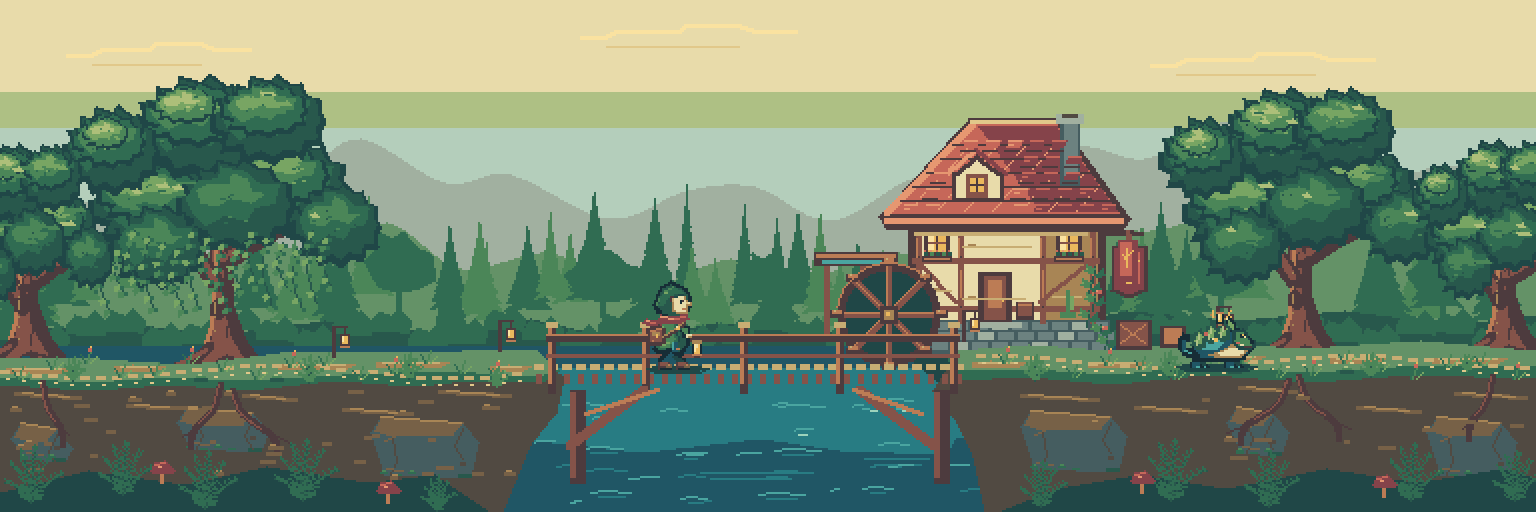
6. Redesign characters around clear silhouettes
The first small character drafts did not read clearly enough. The revision enlarged the canvases and rebuilt the poses around recognizable faces, accessories, and weight. This was an art-direction choice, not a PixelWall size limit.
Mira has a stepped hood, visible face, coral scarf, stitched satchel, brass lantern, and distinct airborne poses. The reedling has a curling teal tail, moss mantle, and antler lantern. Both projects separate the artwork into Body • silhouette and weight; Cloth, leather & lantern; and Face & small highlights.
The three layers contain painted pixels you can edit independently. Try changing a scarf or lantern accent while leaving the body silhouette untouched, then check every pose for consistent placement. The character manifests are already generated and included. Build from a new empty project when replaying them.
mkdir -p reproduced/characters
node tools/cli/pixelwall.mjs new --width 32 --height 48 --name Mira --out reproduced/characters/courier-empty.pixelwall
node source/apply-bounded.mjs reproduced/characters/courier-empty.pixelwall source/character/courier-v2.json reproduced/characters/courier.pixelwall
node tools/cli/pixelwall.mjs render reproduced/characters/courier.pixelwall --frame 16 --scale 4 --out reproduced/characters/mira-jump.png
node tools/cli/pixelwall.mjs new --width 40 --height 32 --name Reedling --out reproduced/characters/reedling-empty.pixelwall
node source/apply-bounded.mjs reproduced/characters/reedling-empty.pixelwall source/character/reedling-v2.json reproduced/characters/reedling.pixelwall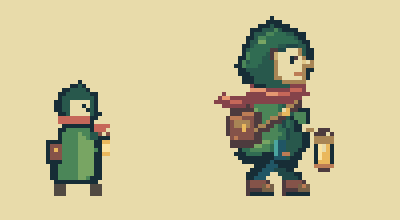
7. Give each motion its own clip
The environment loops use twelve 100 ms frames, or 1.2 seconds. This edition adds a twelve-phase turning waterwheel to each scene alongside changing water highlights and restrained canopy motion. Static roots, banks, and architecture remain linked and anchored.
The frame numbers below are zero-based, matching the CLI. In a timeline that displays frames starting at 1, add one. Idle poses last 180 ms; walk and jump poses last 100 ms. Use the named clips to preview each action rather than treating the complete pose collection as one continuous movement.
- Mira: Idle 0–5, Walk 6–13, Jump 14–19. Idle and Walk loop; Jump is a one-shot clip.
- Reedling: Idle 0–5 and Walk 6–13. Both clips loop.
- Check silhouettes at native size, foot placement, transparent margins, and the transition from the last loop frame back to the first. Different frame data alone does not prove that motion feels good.
8. Continue in the desktop editor with an agent
Desktop MCP was BLOCKED in this revision’s test: read-only inspection timed out, and PixelWall displayed ECONNRESET and EPIPE connection errors. Their cause remains unresolved. This edition used the CLI for creation, rendering, and native checkpoints; no new desktop edit, library save, artifact checkpoint, or cross-interface reopen is claimed. The connection instructions below remain an optional workflow reference.
The CLI rebuild works without a running editor. For live desktop editing, open PixelWall, enable Help → Allow local agent connection, and choose an approved export folder. Configure your agent with the official pixelwall-mcp.mjs launcher from the CLI bundle, following the desktop MCP guide. The connection controls the opted-in local window; it is not a hosted service.
Have the agent inspect the current project and revision before applying a bounded edit. Use expectedRevision so an intervening human edit cannot silently be overwritten. For long operations, retain the operation ID and poll until completion; staged progress is not a committed edit.
After visual review, export a native project checkpoint under a new filename. Ask the desktop artifact tool to save it to the approved folder, verify the delivered file, then inspect and render it with the CLI. Editing, library saving, export generation, and a verified disk checkpoint are separate outcomes.
9. Export frames and build a viewer
Keep the native .pixelwall files as the editable source of truth. Individual frame PNGs retain transparency and are enough to reproduce the viewer. The command below exports all twenty Mira poses to a new folder; use ranges 0,13 for the reedling and 0,11 for either environment.
GIF, sprite-sheet, atlas, and game-package generation require Pro. Updated desktop Pro GIF/sheet export was BLOCKED in this revision, so the revised environments are supplied as individual PNGs and externally encoded MP4 loops. The earlier edition’s desktop Pro exports are historical assets; they are not presented as revised exports. The character projects remain unchanged.
The public viewer loads PixelWall PNG exports. Its JavaScript supplies keyboard movement, jumping, camera follow, parallax, and a 24-second tour. These are viewer features, not PixelWall gameplay or collision tools. The download includes the viewer source and frames so you can inspect that boundary or build your own presentation. It is a demonstration, not a finished game.
A preview delivery issue in the local handoff mixed older and newer artwork after files were replaced at the same URLs. The published revision uses a separate immutable release folder, preloads every environment frame, near layer, parallax background, and character frame, and waits for all images to decode. A failed load keeps playback stopped and offers a retry. Older release assets remain available at their original URLs.
node tools/cli/pixelwall.mjs export projects/courier.pixelwall --format png --frame-range 0,19 --out-dir reproduced/mira-frames
node tools/cli/pixelwall.mjs inspect projects/courier.pixelwall10. Verify the handoff and keep the failures visible
Independent CLI review reopened all three revised scene projects and compared all 36 rendered frames as decoded RGBA pixels: 12 overworld, 12 side-view, and 12 Lantern Ford showcase frames. All matched. The twelve side-view parallax layer composites also match their corresponding full scene before camera transforms. The two character projects are unchanged from the previous edition.
The original desktop library-save failure remains FAIL. Large imports were previously BLOCKED by the same library budget. This revision’s desktop MCP connection was also BLOCKED, so the newer CLI checks must not be read as a successful revised desktop save or cross-interface test. Native file delivery preserves editable artwork independently of those failed or blocked operations.
The supplied final manifests replay onto the included earlier environment projects. Use the public validation summary for this edition’s reproduction checks. Keep input files, inspect each named clip, and render the first and last frames before replacing a valued project. Hard-reload recovery of an unsaved environment was not tested.
The original edition’s 58-frame CLI-to-desktop-checkpoint agreement remains historical evidence for that artwork. It is separate from this edition’s 36-frame CLI verification; old desktop checkpoints and editor screenshots do not establish the revised artwork’s desktop status.
The visuals are substantially improved and ready for marketing review. Broad earth and water planes, repeated foliage vocabulary, and quieter overworld areas still leave room for art direction. Final art approval should come before any “AAA” positioning. The supplied videos are encoded artwork loops, not editor screen recordings.
Common questions
Do I need an AI agent or Pro to follow the guide?
No agent is required to open and edit the supplied projects or run the saved CLI commands. Editing, Lua, native project files, and individual PNG exports are free. Creating GIFs, sprite sheets, atlases, or game packages requires Pro.
Can I edit the characters one layer at a time?
Yes. Mira and the reedling each have three painted layers, with named Idle and Walk clips; Mira also has Jump. Open the native .pixelwall project to keep that structure. A flattened PNG does not preserve the editable layers.
Does the viewer demonstrate a complete PixelWall game engine?
No. PixelWall creates and exports the artwork and animation frames. The separate viewer implements movement, jumping, camera follow, and parallax. It has no collision-aware gameplay or height-aware terrain.
Why does a saved export not fix the library-save failure?
The local document library and exported project files are different storage paths. The library reached its budget in this test. A verified file checkpoint preserved the artwork, but the original library operation still failed.